ROBOTICA Studio 1.5 - Build Faster
Tiago Carvalho
May 06, 2026
ROBOTICA Studio goes 1.5! 🚀
This release brings three new important updates:
- Standard asset library
- Articulation setup based on mesh geometry
- Color sensor
- Minor bug fixes
Standard Asset Library
Getting from “blank scene” to a realistic automation layout is now significantly quicker.
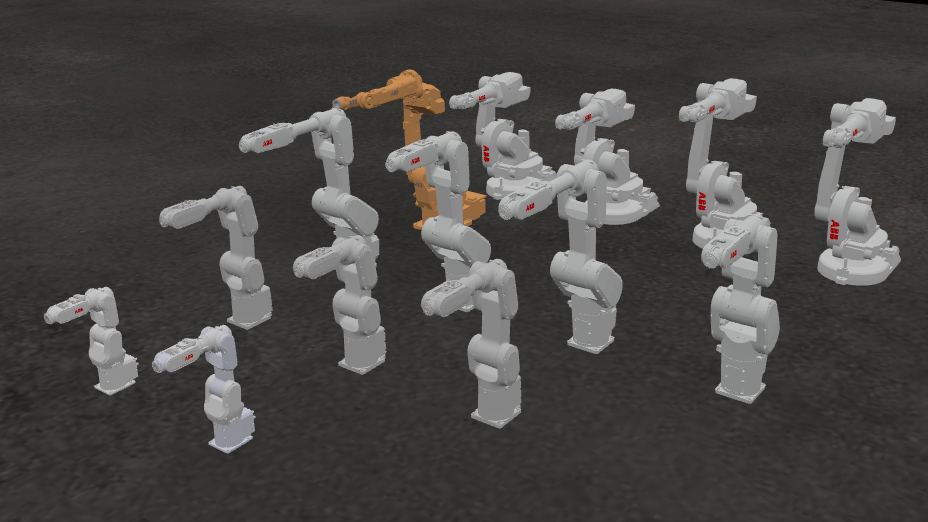
ROBOTICA Studio 1.5 introduces a standard asset library built for everyday industrial automation: robots, grippers, conveyors, peripherals, and more. Assets can be filtered by brand, category, and product reference, helping you assemble a process layout in minutes.
To keep your workflow fast, library components come pre-configured (so you can drop them into a scene and start programming your simulation immediately, instead of setting everything up every component from scratch).
And this is just the start: we’ll keep expanding the library with new components and brands over the next months, driven by the use-cases we see in the field.
We aim to keep models as close to real-world components as possible. However, simulated kinematics and axis behavior may differ from real hardware, depending on manufacturer specifics and controller behavior.
Articulation setup based on mesh geometry
ROBOTICA Studio is built around articulations. Joints, axes, and constraints are what make robots, grippers, and mechanisms behave like real machines. But setting that up manually can be slow and error-prone (especially when you’re importing complex CAD meshes).
With version 1.5, we’re introducing a faster workflow: you can now define articulation anchors directly from the mesh geometry.
How it works:
- Click the Anchor Definition tool and select the geometry reference points on the mesh (faces/edges/areas) to place your anchor accurately.
- Build articulated assemblies quicker and with fewer “adjust postion and check” iterations.
Why this is helpful:
- Faster robot/mechanism creation (especially for multi-joint systems).
- More reliable articulation alignment (less time debugging and calculating joint anchors).
This way there is less setup friction and more time validating motion, reachability, collisions, and sequencing.
Color sensor
We’re actively expanding ROBOTICA Studio’s component ecosystem, and sensors are a key part of simulations. Version 1.5 adds a Color Sensor designed for common industrial scenarios like sorting, inspection, and routing logic.
How it works:
- Define your sensor's anchor point and detection range.
- Configure one or more target colors to detect.
- Set a detection accuracy level parameter .
You can then use it to validate automation flows such as diverting parts on conveyors, quality checks, sorting to bins by color, trigerring different actions based on a workparts color.