ROBOTICA Studio 1.6 - A New Level of Immersion
Tiago Carvalho
Jun 02, 2026
ROBOTICA Studio goes 1.6! 🚀
This release brings three four important updates:
- Articulation tool
- Joint limits and initial positions
- Updated signals
- New camera movement instruction
Articulation tool
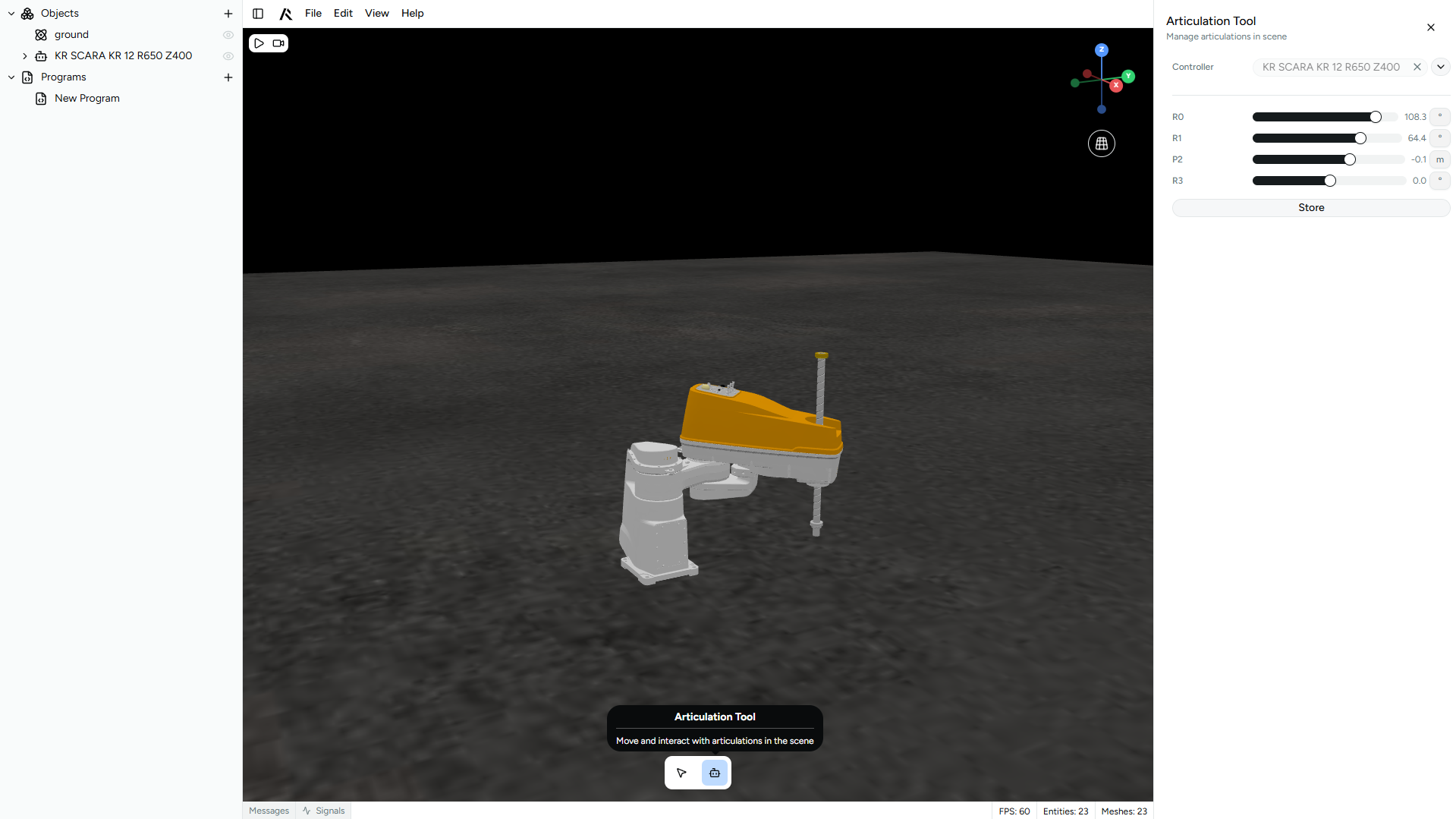
We are introducing a new way to interact with ROBOTICA Studio using tools. Tools are a set of functionalities that let you configure and set up things in edit time.
In the case of the articulation tool, you can during the edit time test your articulation, by editing the values of prismatic and revolute joints, and at the same time store initial positions of your articulated body, just like in real world setups.
Instead of entering simulation mode just to validate motion, you can now interactively move joints and evaluate how your mechanism behaves directly in edit time.
This helps you:
- Build and validate articulated assemblies faster.
- Reduce trial-and-error iterations.
- Debug joint behavior before running the simulation.
Joint limits and initial positions
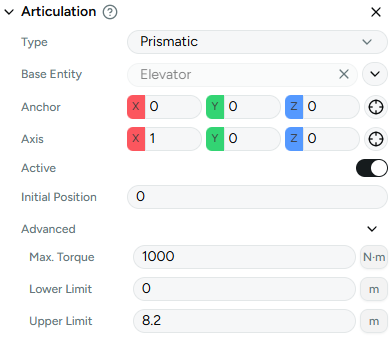
This release brings three new configuration fields to the articulation controller:
- joints initial positions
- upper mechanical limits
- lower mechanical limits
Joint limits
We are bringing joint limits to ROBOTICA Studio so you can build articulations that are closer to real setups. Inside the articulation component you will be able to set up the lower and upper limits of revolute and prismatic joints.
This allows you to:
- Prevent unrealistic movements.
- Respect mechanical constraints.
- Simulate more reliable and accurate systems.
Initial positions
When an articulation is built inside ROBOTICA Studio, not always the 3D CAD is in the perfect conditions. We added a parameter called initial position where you can state the position of the joints before entering the simulation.
The initial position and limits will be used by the articulation tool for you to test your articulation, and evaluate its functionality. This means less friction in the setup phase and more focus on validating motion, reachability and sequencing.
Note that changing the initial position directly on the component will not change the articulation's position, it will just change the current position of the joint. To visually change the position, you must use the articulation tool.
New signals
We are bringing new signals that will help you program even more complex simulation.
Conveyor
- A brand new integer speed signal for you to program and interact with dynamic conveyor speeds
- A brand new boolean signal to invert the direction of your conveyor during runtime
- A brand new output that states if the conveyor is running or not
These signals allow you to simulate adaptive flow logic, speed variations and bidirectional transport systems.
Vacuum
- A brand new vacuum output, that states if a component is attached to your vacuum component
This makes pick-and-place validation more reliable and allows tighter synchronization between gripping logic and motion.
Articulation controller
- A brand new output that states if an articulation controller (a robot, a cartesian axis or machine) is running
Move camera
We are introducing a new camera movement instruction that allows you to create more immersive and dynamic presentations of your automation concepts.
You can now define predefined camera points and program the camera to move between them during simulation.
This allows you to:
- Create cinematic walkthroughs of your automation layout.
- Highlight critical moments of the process.
- Show robot motion, synchronization and interaction from multiple angles.
- Generate kinematic videos ready to present to clients or stakeholders.
Instead of recording static screen captures, you can now design a guided visual experience of your concept. This makes it easier to communicate complex automation logic, demonstrate feasibility and motion flow and present your solution in a more professional and immersive way.
ROBOTICA Studio is not only about validating automation, it is also about helping you explain it clearly and convincingly.